
logo
    • Buy Crypto
    • Markets
    • Futures
    • Spot
    • Earn
    • Affiliates & AI
    • More
    Popular topics
    Latest articles
    Featured articles
    Announcements
    Latest updates
    Futures events
    Spot events
    Rewards
    TradFi
    Listings/Delistings
    Spot listings
    Futures listings
    Spot delistings/maintenance
    Futures delistings/maintenance
    Earn delistings/maintenance
    About WEEX
    Community channels
    Account security
    About the platform
    Compliance
    Terms of Use and Policies
    Careers
    FAQ
    Deposit/Withdrawal
    Account access and verification
    Explore WEEX
    Common trading issues
    Futures essentials
    Compensation
    Copy trading
    How-to guides
    FAQ
    Elite traders
    Copiers
    WEEX app
    Downloading the app
    Quick Buy/OTC
    Quick Buy
    ChipPay
    OSL Pay
    P2P
    P2P announcements
    Getting started
    Merchant guide
    P2P appeals
    P2P Trading Tips and rules
    WEEX API
    API announcements
    API trading pairs
    Tutorials
    Futures trading
    Futures guide
    Auto Earn
    Spot trading
    Glossary
    Affiliate program
    Earn
    Staking
    Hackathon
    Hackathon updates
    1. Help Center
    2. P2P
    3. Getting started
    4. How to filter ads/merchants th...
    Popular topics
    Latest articles
    Featured articles
    Announcements
    Latest updatesFutures eventsSpot eventsRewardsTradFi
    Listings/Delistings
    Spot listingsFutures listingsSpot delistings/maintenanceFutures delistings/maintenanceEarn delistings/maintenance
    About WEEX
    Community channelsAccount securityAbout the platformComplianceTerms of Use and PoliciesCareers
    FAQ
    Deposit/WithdrawalAccount access and verificationExplore WEEXCommon trading issuesFutures essentialsCompensation
    Copy trading
    How-to guidesFAQElite tradersCopiers
    WEEX app
    Downloading the app
    Quick Buy/OTC
    Quick BuyChipPayOSL Pay
    P2P
    P2P announcementsGetting startedMerchant guideP2P appealsP2P Trading Tips and rules
    WEEX API
    API announcementsAPI trading pairs
    Tutorials
    Futures tradingFutures guideAuto EarnSpot tradingGlossaryAffiliate program
    Earn
    Staking
    Hackathon
    Hackathon updates

    How to filter ads/merchants that meet your needs on WEEX P2P?

    By: WEEX
    |
    0
    On the WEEX P2P trading page, use filters to easily find ads by merchant type, payment method, and trade conditions, for a smoother, more secure experience.
     

    How to filter P2P ads?

    Step 1: Open the P2P Trading page

    1. Log in to the WEEX app.
    2. Go to the P2P Trading page.
    3. Select your preferred trading type:
      1. Buy: Select this option to purchase cryptocurrency.
      2. Sell: Select this option to sell cryptocurrency.

    Step 2: Set your filters

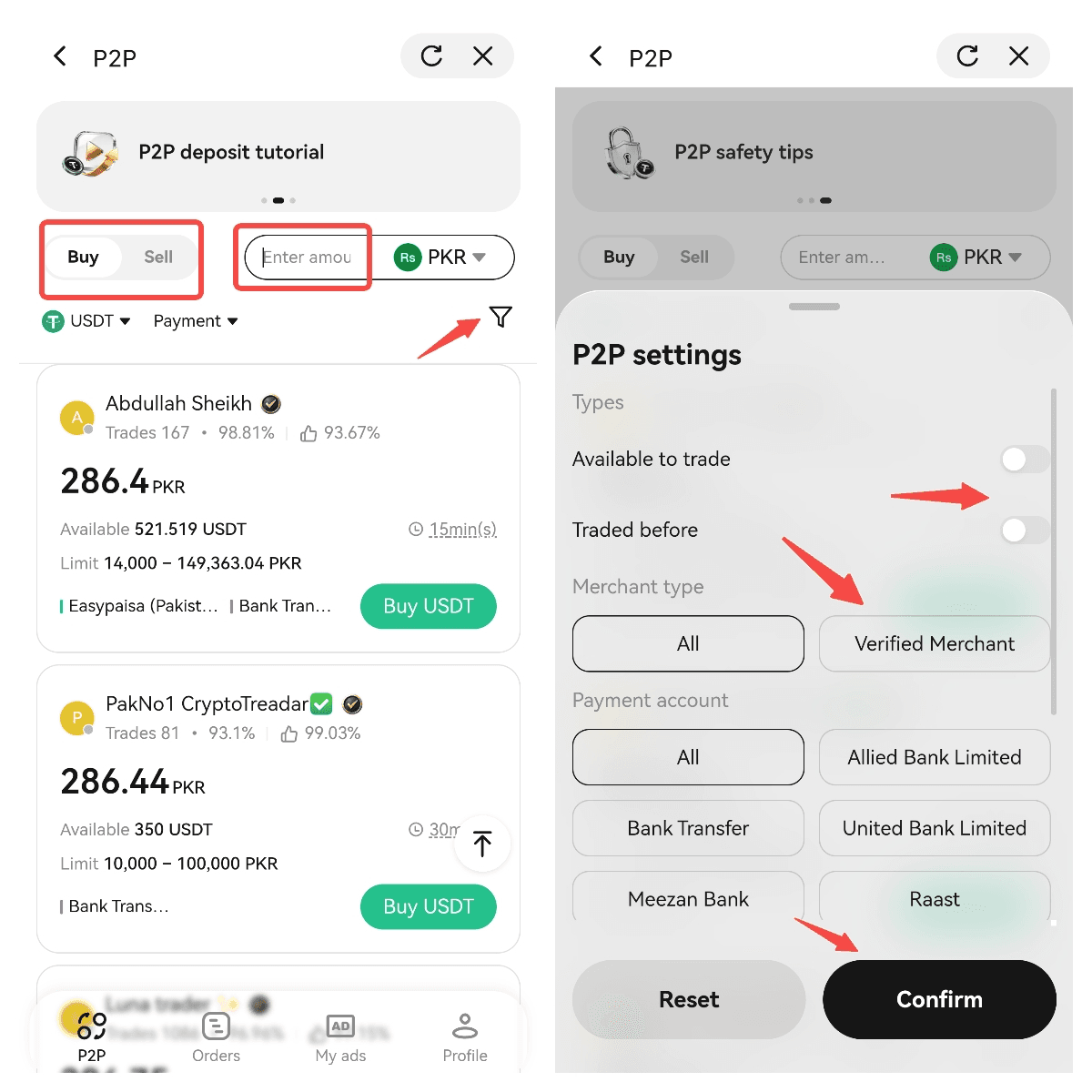
    1. Tap the Filter button on the trading page.
    2. Enter the filter settings page.
    3. Select the filter criteria according to your needs.
    p2p1.png
    WEEX P2P currently supports the following filters:
    1. Trading status

    You can filter ads based on your trading history:
     
    Available to trade
    • Displays ads from merchants who are currently accepting orders.
    Traded before
    • Prioritizes ads from merchants you have traded with before, for easier repeat transactions.
    1. Merchant type

    You can filter ads based on merchant verification status:
     
    All
    • Displays all available ads that meet your requirements.
    Verified merchant
    • Displays only ads from merchants who have passed WEEX's verification process.
    Verified merchants are reviewed by the platform and generally provide a more reliable trading experience and more secure transactions. This option is suitable for users who prefer to trade with trusted counterparties.
     
    1. Payment method

    You can select your preferred payment method, such as:
    • Bank transfer
    • Local bank account
    • Electronic payment method
    After selecting a payment method, the system will prioritize displaying ads that support the selected payment option, helping you find suitable orders faster.
     

    Step 3: Confirm filter results and select an ad

    After setting your filters:
    1. Tap Confirm.
    2. The system will display ads that match your selected criteria.
    3. Choose a suitable ad based on the following factors:
    FilterRecommendation
    Merchant typePrioritize verified merchants
    PriceCompare multiple ads and select a reasonable offer
    Payment methodChoose a payment method you can complete quickly
    Trading limitConfirm that the minimum and maximum limits meet your needs
    Merchant trading historyPrioritize active merchants with stable trading records
    FilterRecommendation
    Merchant typePrioritize verified merchants
    PriceCompare multiple ads and select a reasonable offer
    Payment methodChoose a payment method you can complete quickly
    Trading limitConfirm that the minimum and maximum limits meet your needs
    Merchant trading historyPrioritize active merchants with stable trading records

    FAQ

    1. Why do I still see some ads that do not fully match my filter criteria?

    This may happen due to the following reasons:
    1. There are currently no ads that completely match your selected criteria.
    2. The merchant has insufficient available ads or trading limits.
    3. The ad status has changed, for example:
      1. The merchant temporarily disabled the ad
      2. The available trading amount has reached the limit
      3. The ad has already been completed by another user
    You can try:
    • Adjusting your filter criteria
    • Increasing or changing the trading amount range
    • Selecting another payment method
    • Refreshing the P2P page to load the latest ads
     
    2. What are the benefits of choosing a verified merchant?
     
    Trading with verified merchants helps you:
    • Choose trading partners who have passed platform verification
    • Reduce potential transaction risks
    • Enjoy a more stable trading experience
    At the same time, ensure that you:
    • Always complete transactions through the WEEX P2P order process
    • Do not release cryptocurrency before confirming receipt of payment
    • Do not accept any requests for off-platform transactions
     
    3. Why can't I select some ads?
     
    Some ads may have specific trading requirements, such as:
    • Specific payment methods
    • Trading amount restrictions
    • User eligibility requirements
    If you do not meet the requirements of an ad, the system may prevent you from creating an order.
    If this happens, you can select another ad that matches your conditions.
     
    4. Will filter settings affect ad prices?
     
    No. The filter feature only helps you find ads that match your requirements and does not change the ad price.
    The final trading price is determined by the price set by the merchant. Before confirming a transaction, be sure to check:
    • Price per unit
    • Trading amount
    • Payment method
    • Merchant trading requirements
     
    5. Does the filter feature support all P2P fiat currencies and payment methods?
     
    Available filter options may vary depending on supported fiat currencies, payment methods, and current market conditions. If a payment method or filter option is unavailable, it may mean that there are currently no ads that match your criteria.
    Related articles
    How to post ads as a regular userHow to sell cryptocurrencies via WEEX P2P?Common crypto P2P scams and how to avoid themHow to buy cryptocurrencies via WEEX P2P?WEEX P2P trading FAQ
    Share
    copy

    Gainers

    logoCommunity
    iconiconiconiconiconiconicon
    Customer Support:@weikecs
    Business Cooperation:@weikecs
    Quant Trading & MM:bd@weex.com
    VIP Program:support@weex.com
    • About Us
    • Announcement Center
    • Media Kit
    • WEEX Community
    • WXT Zone
    • Announcement
    • Legal Statement
    • Risk Disclosure
    • Terms and Policies
    • Privacy Policy
    • Whistleblower Notice
    • AML/CTF Policy
    • Law Enforcement
    • User Guide
    • Product Launches
    • Crypto News
    • Product Launches
    • Crypto Wiki
    • Learn
    • Q&A
    • Spot
    • Futures
    • Glossary
    • VIP Program
    • Download
    • Affiliate
    • Protection Fund
    • Proof of Reserves
    • Sitemap
    • ETFs
    • Crypto Prices
    • Price Predictions
    • WXT Price
    • BTC Price
    • ETH Price
    • DOGE Price
    • How to Buy Crypto
    • How to Buy WXT
    • How to Buy BTC
    • How to Buy ETH
    • How to Buy DOGE
    • Help Center
    • Fee Schedule
    • Trading Rules
    • WEEX Academy
    • Contact Verifier
    • Submit Feedback
    • About Us
    • Announcement Center
    • Media Kit
    • WEEX Community
    • WXT Zone
    • Announcement
    • Help Center
    • Fee Schedule
    • Trading Rules
    • WEEX Academy
    • Contact Verifier
    • Submit Feedback
    • Customer Support Bot
    • VIP Services
    • Legal Statement
    • Risk Disclosure
    • Terms and Policies
    • Privacy Policy
    • Whistleblower Notice
    • AML/CTF Policy
    • Law Enforcement
    • Proof of Reserves
    • Invite Friends
    • OTC
    • Download
    • Affiliate
    • VIP Program
    • API
    • Broker
    • Listing Application
    • Affiliate T&C
    • Sitemap
    • Futures
    • Spot
    • Copy Trade
    • Markets
    • WEEX Store
    • User Guide
    • Product Launches
    • Crypto News
    • Product Launches
    • Crypto Wiki
    • Learn
    • Q&A
    • Spot
    • Futures
    • Glossary
    • VIP Program
    • Download
    • Affiliate
    • Protection Fund
    • Proof of Reserves
    • Sitemap
    • ETFs
    • Crypto Prices
    • Price Predictions
    • WXT Price
    • BTC Price
    • ETH Price
    • DOGE Price
    • How to Buy Crypto
    • How to Buy WXT
    • How to Buy BTC
    • How to Buy ETH
    • How to Buy DOGE
    • About Us
    • Announcement Center
    • Media Kit
    • WEEX Community
    • WXT Zone
    • Announcement
    • Help Center
    • Fee Schedule
    • Trading Rules
    • WEEX Academy
    • Contact Verifier
    • Submit Feedback
    • Legal Statement
    • Risk Disclosure
    • Terms and Policies
    • Privacy Policy
    • Whistleblower Notice
    • AML/CTF Policy
    • Law Enforcement
    • Customer Support Bot
    • VIP Services
    • Futures
    • Spot
    • Copy Trade
    • Markets
    • WEEX Store
    • Proof of Reserves
    • Invite Friends
    • OTC
    • Download
    • Affiliate
    • VIP Program
    • API
    • Broker
    • Listing Application
    • Affiliate T&C
    • Sitemap
    • User Guide
    • Product Launches
    • Crypto News
    • Product Launches
    • Crypto Wiki
    • Learn
    • Q&A
    • Spot
    • Futures
    • Glossary
    • VIP Program
    • Download
    • Affiliate
    • Protection Fund
    • Proof of Reserves
    • Sitemap
    • ETFs
    • Crypto Prices
    • Price Predictions
    • WXT Price
    • BTC Price
    • ETH Price
    • DOGE Price
    • How to Buy Crypto
    • How to Buy WXT
    • How to Buy BTC
    • How to Buy ETH
    • How to Buy DOGE

    Where new wealth is made

    Download app

    Sign Up
    h5 logo
    Download